

Pocket Sprint Laps
Stopwatch with oversized digits and full lap history. No sign-up needed.
Updated:
Aug 31, 2026
Released:
Aug 31, 2026
Version:
1.0.0
Content rating
Everyone
Android required
7.0 (API 24)
Installs:
0+
Pricing
Free
Interaction / notes
—
Category
app / sports
Package name
Detailed description
Pocket Sprint Laps is a straightforward stopwatch built for people who want to time their sessions without digging through menus or dealing with unnecessary features.
The display uses large, bold digits that stay readable at a glance — whether you are on a track, at a gym, or timing any activity where you cannot stop to squint at a screen. Lap splits are captured with a single tap and stored in a scrollable list for the entire session. Every split shows elapsed time alongside the running total, so you can review your pacing without doing mental math.
Everything runs offline. There is no account to create, no data sent anywhere, and no internet connection required. All session data stays on your device.
Controls are minimal by design: start, pause, lap, and reset. The interface is kept clear so the timer stays the focus.
Features include:
- Oversized timer display with high contrast digits
- Instant lap capture with per-lap and total time
- Works completely offline with no account required
- Local data storage only
- Clean, distraction-free layout
If you time runs, drills, intervals, or any kind of repetitive activity and want a dependable lap counter that stays out of your way, this app covers that without extras.
The display uses large, bold digits that stay readable at a glance — whether you are on a track, at a gym, or timing any activity where you cannot stop to squint at a screen. Lap splits are captured with a single tap and stored in a scrollable list for the entire session. Every split shows elapsed time alongside the running total, so you can review your pacing without doing mental math.
Everything runs offline. There is no account to create, no data sent anywhere, and no internet connection required. All session data stays on your device.
Controls are minimal by design: start, pause, lap, and reset. The interface is kept clear so the timer stays the focus.
Features include:
- Oversized timer display with high contrast digits
- Instant lap capture with per-lap and total time
- Works completely offline with no account required
- Local data storage only
- Clean, distraction-free layout
If you time runs, drills, intervals, or any kind of repetitive activity and want a dependable lap counter that stays out of your way, this app covers that without extras.
About Pocket Sprint Laps
Developer
Website
Privacy Policy
Contact
Address
Podvinný mlýn 2126/1 190 00 Praha Czechia
Permissions breakdown
Grouped as shown on Google Play. Informational only.
Other
4 items
• full network access
• draw over other apps
• control vibration
• Google Play license check
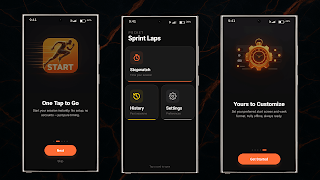
Screenshots
Preview images associated with this app listing.




Versions
For extended version history and archived records, see
the app record on mi9.com
.
Click “Versions” to load.
Comments
Click “Comments” to load.
Similar apps
Apps with similar tags/category.
No similar apps.
More from developer
Other apps from the same developer.


