

Neon Triad Watch Face
Neon Triad: analog neon dial for Galaxy Watch, Pixel Watch & Wear OS
Updated:
Aug 1, 2026
Released:
Aug 1, 2026
Version:
1.0
Content rating
Everyone
Android required
Varies with device
Installs:
1+
Pricing
Paid
Interaction / notes
—
Category
app / personalization
Package name
Detailed description
📱 COMPATIBLE: Samsung Galaxy Watch 8, Ultra, 7, 6, 5 | Google Pixel Watch 4, 3, 2 | All Wear OS 6+ smartwatches
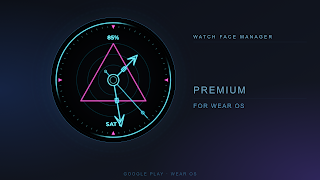
⌚ Neon Triad is an analog watch face built around a glowing neon triangle. A dark dial carries three concentric glow rings, a fine neon minute-tick scale and two sweeping glow-rim arcs, while neon hour and minute hands with open arrowheads and a thin second hand circle a bright center hub.
🎨 COLOR THEMES:
Six two-color neon themes — Triad, Indigo, Violet, Crimson, Aqua and Ember — recolor the rings, hands and glow arcs together with the central triangle accent; everything else keeps its clean neon look.
✨ KEY FEATURES:
🧩 2 Customizable Widgets – Two editable slots (left & right) you fill with your favorite data source
🕓 Analog Hands – Neon hour, minute and second hands over a glowing triangle dial
📅 Date & Battery – Date and battery level shown in the theme color
🎨 6 Color Themes – Triad, Indigo, Violet, Crimson, Aqua, Ember
🌙 AOD Support – Clean always-on display in white: hands, rings, ticks and readouts
✅ Wear OS Optimized – Smooth, efficient performance
🎯 PERFECT FOR:
• Lovers of bold neon and geometric design
• Users who want customizable widgets
• Galaxy Watch 8, Pixel Watch 4 owners who appreciate a glowing dial
⚠️ Note: The watch face may take up to 15 minutes to appear. Search in Play Store on your watch if needed.
⌚ Neon Triad is an analog watch face built around a glowing neon triangle. A dark dial carries three concentric glow rings, a fine neon minute-tick scale and two sweeping glow-rim arcs, while neon hour and minute hands with open arrowheads and a thin second hand circle a bright center hub.
🎨 COLOR THEMES:
Six two-color neon themes — Triad, Indigo, Violet, Crimson, Aqua and Ember — recolor the rings, hands and glow arcs together with the central triangle accent; everything else keeps its clean neon look.
✨ KEY FEATURES:
🧩 2 Customizable Widgets – Two editable slots (left & right) you fill with your favorite data source
🕓 Analog Hands – Neon hour, minute and second hands over a glowing triangle dial
📅 Date & Battery – Date and battery level shown in the theme color
🎨 6 Color Themes – Triad, Indigo, Violet, Crimson, Aqua, Ember
🌙 AOD Support – Clean always-on display in white: hands, rings, ticks and readouts
✅ Wear OS Optimized – Smooth, efficient performance
🎯 PERFECT FOR:
• Lovers of bold neon and geometric design
• Users who want customizable widgets
• Galaxy Watch 8, Pixel Watch 4 owners who appreciate a glowing dial
⚠️ Note: The watch face may take up to 15 minutes to appear. Search in Play Store on your watch if needed.
About Neon Triad Watch Face
Developer
Website
Privacy Policy
Contact
Address
68 of.233 pr. Chervonoi Kalyny Kyiv Ukraine 02064
Permissions breakdown
Grouped as shown on Google Play. Informational only.
Other
1 items
• full network access
Screenshots
Preview images associated with this app listing.



Versions
For extended version history and archived records, see
the app record on mi9.com
.
Click “Versions” to load.
Comments
Click “Comments” to load.
Similar apps
Apps with similar tags/category.


More from developer
Other apps from the same developer.

Prestige: Watch Faces Wear OS
Time Design LLC · Personalization

POP Time Watch Face
Time Design LLC · Personalization

Candy Time Watch Face
Time Design LLC · Personalization

Watch Faces App for Wear OS
Time Design LLC · Personalization

Old School Watch Face
Time Design LLC · Personalization

Orbit Time Watch Face
Time Design LLC · Personalization