

CWF016 Raptor X Watch Face
CWF016 Raptor X Watch Face: A predatory look!
Updated:
May 20, 2026
Released:
Sep 13, 2024
Content rating
Everyone
Android required
Varies with device
Installs:
1K+
Pricing
Free
Interaction / notes
—
Category
app / personalization
Package name
Detailed description
CWF016 Raptor X Watch Face - Stunning and Customizable Watch Face
Transform your Wear OS device with the CWF016 Raptor X Watch Face, where style meets functionality! This unique watch face offers a visually stunning experience while making your daily life more convenient with its wide range of customization options.
Key Features:
8 Different Index Styles: Choose the one that suits your style and enjoy keeping track of time.
10 Background Options: Customize your watch face to match your mood or outfit.
10 Color Options: Modify the colors of the hands and other elements to reflect your preferences.
Multiple Text Color Choices: Make your display clear and eye-catching with various text color options.
Advanced Functionalities:
Step Counter: Keep track of your daily steps and hit your fitness goals.
Heart Rate Monitor: Stay on top of your health with real-time heart rate data.
Battery Level Indicator: Check your battery status at a glance.
Notification Counter: Instantly see how many notifications are waiting for you.
AM/PM Indicator: Easily track the time of day.
Month and Day Display: Always know the current month and day with this handy feature.
The CWF016 Raptor X Watch Face offers both modern and classic designs, catering to every taste. Its user-friendly interface allows you to personalize your watch face effortlessly, making your daily routines more enjoyable.
Enhance your Wear OS device and make every moment count with the CWF016 Raptor X Watch Face!
WARNING:
This app is for Wear OS Watch Face devices. It only supports smartwatch devices running WEAR OS.
Supported Devices:
Samsung Galaxy Watch 4, Samsung Galaxy Watch 5, Samsung Galaxy Watch 6, Samsung Galaxy Watch 7 and so on.
Transform your Wear OS device with the CWF016 Raptor X Watch Face, where style meets functionality! This unique watch face offers a visually stunning experience while making your daily life more convenient with its wide range of customization options.
Key Features:
8 Different Index Styles: Choose the one that suits your style and enjoy keeping track of time.
10 Background Options: Customize your watch face to match your mood or outfit.
10 Color Options: Modify the colors of the hands and other elements to reflect your preferences.
Multiple Text Color Choices: Make your display clear and eye-catching with various text color options.
Advanced Functionalities:
Step Counter: Keep track of your daily steps and hit your fitness goals.
Heart Rate Monitor: Stay on top of your health with real-time heart rate data.
Battery Level Indicator: Check your battery status at a glance.
Notification Counter: Instantly see how many notifications are waiting for you.
AM/PM Indicator: Easily track the time of day.
Month and Day Display: Always know the current month and day with this handy feature.
The CWF016 Raptor X Watch Face offers both modern and classic designs, catering to every taste. Its user-friendly interface allows you to personalize your watch face effortlessly, making your daily routines more enjoyable.
Enhance your Wear OS device and make every moment count with the CWF016 Raptor X Watch Face!
WARNING:
This app is for Wear OS Watch Face devices. It only supports smartwatch devices running WEAR OS.
Supported Devices:
Samsung Galaxy Watch 4, Samsung Galaxy Watch 5, Samsung Galaxy Watch 6, Samsung Galaxy Watch 7 and so on.
About CWF016 Raptor X Watch Face
Developer
Website
—
Privacy Policy
Contact
Address
ÇUKURAMBAR MAH. EROL YAŞAR TÜRKALP CAD. NO: 26 İÇ KAPI NO: 12 Fildişi Evleri, B Blok, Kat: 4, Daire 12 06530 Çankaya/Ankara Türkiye
Permissions breakdown
Grouped as shown on Google Play. Informational only.
Other
1 items
• full network access
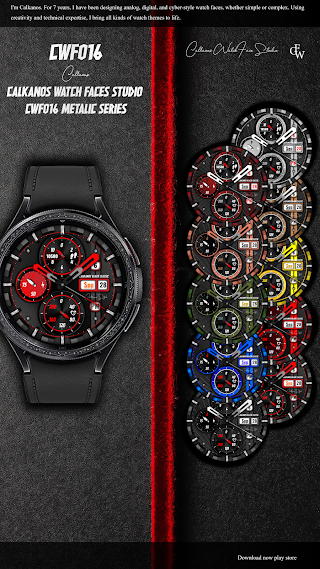
Screenshots
Preview images associated with this app listing.




Versions
For extended version history and archived records, see
the app record on mi9.com
.
Click “Versions” to load.
Comments
Click “Comments” to load.
Similar apps
Apps with similar tags/category.

Hybrid AVIUMI CTS83 Watch face
CanvasTime Studio · Personalization

AN004-A Analog watch face
AN-Wear Designs · Personalization

SD158
Speedydesign · Personalization

Chester Modern classics
CHESTER WATCH FACES · Personalization

Extreme Analog 2 Wear OS 5+
OQ Watchfaces · Personalization

Grey Camouflage For Wear OS
ZKin · Personalization
More from developer
Other apps from the same developer.

Rock Record Watch Face
Calkanos Watch Faces Studio · Personalization

Calkanos Watch Face Gallery
Calkanos Watch Faces Studio · Personalization

CWF020 Matte Gold Watch Face
Calkanos Watch Faces Studio · Personalization

CWF019 Paper Art Watch Face
Calkanos Watch Faces Studio · Personalization

CWF018 Blue Watch Face
Calkanos Watch Faces Studio · Personalization

CWF017 Rose Gold Watch Face
Calkanos Watch Faces Studio · Personalization