

Weather Digital Watch Face G03
Digital watch face with weather for Wear OS
Updated:
Aug 17, 2026
Released:
Apr 22, 2026
Content rating
Everyone
Android required
Varies with device
Installs:
100+
Pricing
Paid
Interaction / notes
—
Category
app / personalization
Package name
Detailed description
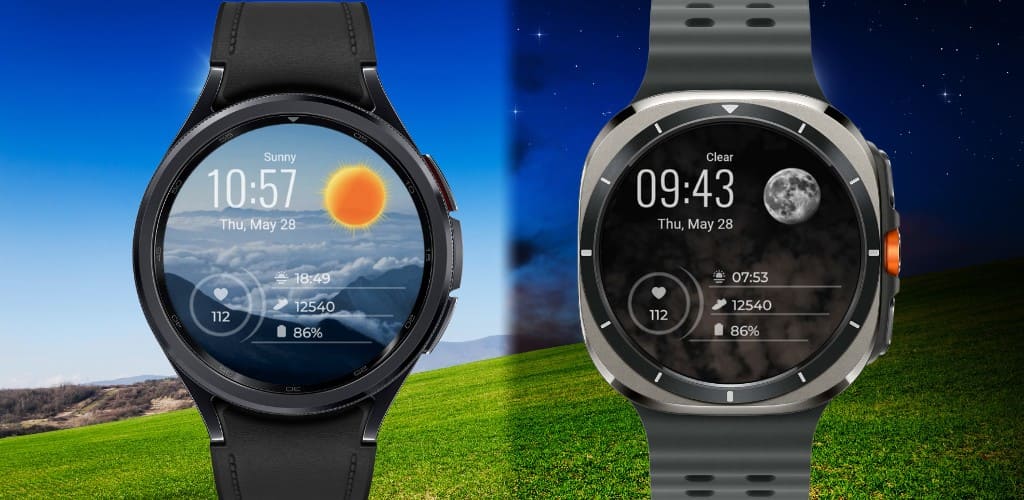
The Weather digital watch face is a simple and clean watch face focused on time and weather.
It automatically changes between day and night, so it always matches the time of day. The weather icons also change based on the temperature, giving a more accurate feel instead of using static icons.
This watch face is made for anyone who prefers a clean look with useful information, without too many extra details.
✨ Key Features
- Automatic day and night theme
- Weather icons that change based on temperature
- 5+ Day Wallpapers
- 4 custom complications
- 1 App shortcut
- Multiple color options
- Minimal always-on display
- 12-hour and 24-hour time format
☀️ IMPORTANT: If the weather doesn't update:
1. Try switching between different watch faces.
2. Open the default “Weather” app on your watch and make sure location permission is enabled.
3. Set location access to “Always Allow” for both the watch face and the weather provider.
4. Ensure Location (GPS) is turned ON on both your watch and the paired smartphone.
5. Disable Power Saving mode so background data can sync properly.
⚠️ Compatibility
This is a Wear OS watch face app for smartwatches running Wear OS 5 or higher, built with the new Watch Face Format required on modern devices.
Compatible devices include:
- Samsung Galaxy Watch Series (including Classic and Ultra models)
- Google Pixel Watch Series
- Other watches running Wear OS 5+
Contact Us
If you have questions or feedback, feel free to contact me at [email protected] for support.
It automatically changes between day and night, so it always matches the time of day. The weather icons also change based on the temperature, giving a more accurate feel instead of using static icons.
This watch face is made for anyone who prefers a clean look with useful information, without too many extra details.
✨ Key Features
- Automatic day and night theme
- Weather icons that change based on temperature
- 5+ Day Wallpapers
- 4 custom complications
- 1 App shortcut
- Multiple color options
- Minimal always-on display
- 12-hour and 24-hour time format
☀️ IMPORTANT: If the weather doesn't update:
1. Try switching between different watch faces.
2. Open the default “Weather” app on your watch and make sure location permission is enabled.
3. Set location access to “Always Allow” for both the watch face and the weather provider.
4. Ensure Location (GPS) is turned ON on both your watch and the paired smartphone.
5. Disable Power Saving mode so background data can sync properly.
⚠️ Compatibility
This is a Wear OS watch face app for smartwatches running Wear OS 5 or higher, built with the new Watch Face Format required on modern devices.
Compatible devices include:
- Samsung Galaxy Watch Series (including Classic and Ultra models)
- Google Pixel Watch Series
- Other watches running Wear OS 5+
Contact Us
If you have questions or feedback, feel free to contact me at [email protected] for support.
About Weather Digital Watch Face G03
Developer
Website
Privacy Policy
Contact
Address
Flat No - 301, Shree Vighnhartha SOC, Sector 8A, Airoli Navi Mumbai, Maharashtra 400708 India
Permissions breakdown
Grouped as shown on Google Play. Informational only.
Other
3 items
• full network access
• prevent device from sleeping
• Google Play license check
Screenshots
Preview images associated with this app listing.


Versions
For extended version history and archived records, see
the app record on mi9.com
.
Click “Versions” to load.
Comments
Click “Comments” to load.
Similar apps
Apps with similar tags/category.

TMZ Watch Face
TMZ Visionary · Art & Design

Smart Forecast Watch Face
Futorum · Weather

Digital watch face D32
VG Faces · Personalization

SamWatch InfoBlock Weather 11
Samtree · Personalization

Nature Mist Graphite Dial
Ante Creativity · Personalization

Ocean Paradise Watch Face
Shagun Clock Watch Faces · Tools
More from developer
Other apps from the same developer.

Doodle 2 Digital Watch Face
Gadget Liv · Personalization

Minimal Weather Watch Face G04
Gadget Liv · Personalization

Pix Concentric 2 Watch Face
Gadget Liv · Personalization

Paper Time Digital Watch Face
Gadget Liv · Personalization

Retro LCD Watch Face: GL103
Gadget Liv · Personalization

Material You Style 2 WatchFace
Gadget Liv · Personalization