

OnePlus Shelf
Shelf helps to access OnePlus services & widgets from apps installed on device.
Updated:
Oct 8, 2022
Content rating
Everyone
Android required
Varies with device
Installs:
50M+
Pricing
Free
Interaction / notes
—
Category
app / tools
Package name
Detailed description
Key Improvements to Shelf:
Access Shelf from anywhere
You can open Shelf from the top right section of the status bar, from your home screen, or when any other app is open. This helps to open Shelf anytime and access your cards & widgets.
Personalisation with resizable cards
With the new Shelf, you can resize the cards to multiple sizes based on your choice and rearrange the cards within the grid. Currently Toolbox & Notes cards supports multiple sizes.
A smarter Scout search
Search for apps, shortcuts, files, contacts, settings & more. Users in India & North America can also search for music, movies, artists, food & more.
Cards available on Shelf:
1. Scout search bar: You can search by text or voice commands. Alternatively, you can also pull down the Shelf screen to open Scout.
2. Weather information: Get weather information for your live location
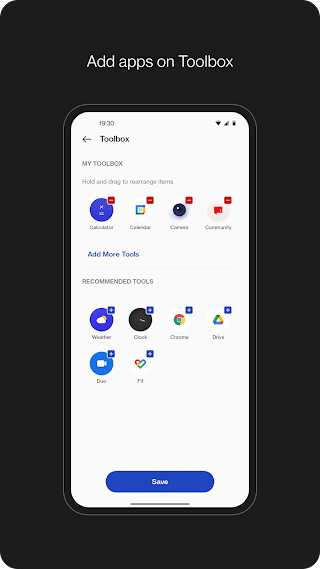
3. Toolbox: Add apps of your choice to Shelf to quickly open when you need them.
4. Step Counter or Health card: Count daily steps to keep track of your activity. When your device is connected to OnePlus Watch, you get additional data from Health app for workout, calories burnt, & activity period along with step count.
5. Data usage: Keep track of your mobile data usage per bill cycle. If the data limit is set, you can see the graph for data consumed & data left within the bill cycle.
6. Storage usage: Keep track of the storage used & left on your device.
7. Notes: Write quick notes on Shelf & set reminders. If OnePlus Notes app is installed, notes created on Shelf will also be available to access from OnePlus Notes app.
8. Sports: Get live scores, upcoming matches for your favorite teams in Cricket & Football. Sports card is available for users in India only.
9. Widgets: Add widgets from apps installed on device.
Access Shelf from anywhere
You can open Shelf from the top right section of the status bar, from your home screen, or when any other app is open. This helps to open Shelf anytime and access your cards & widgets.
Personalisation with resizable cards
With the new Shelf, you can resize the cards to multiple sizes based on your choice and rearrange the cards within the grid. Currently Toolbox & Notes cards supports multiple sizes.
A smarter Scout search
Search for apps, shortcuts, files, contacts, settings & more. Users in India & North America can also search for music, movies, artists, food & more.
Cards available on Shelf:
1. Scout search bar: You can search by text or voice commands. Alternatively, you can also pull down the Shelf screen to open Scout.
2. Weather information: Get weather information for your live location
3. Toolbox: Add apps of your choice to Shelf to quickly open when you need them.
4. Step Counter or Health card: Count daily steps to keep track of your activity. When your device is connected to OnePlus Watch, you get additional data from Health app for workout, calories burnt, & activity period along with step count.
5. Data usage: Keep track of your mobile data usage per bill cycle. If the data limit is set, you can see the graph for data consumed & data left within the bill cycle.
6. Storage usage: Keep track of the storage used & left on your device.
7. Notes: Write quick notes on Shelf & set reminders. If OnePlus Notes app is installed, notes created on Shelf will also be available to access from OnePlus Notes app.
8. Sports: Get live scores, upcoming matches for your favorite teams in Cricket & Football. Sports card is available for users in India only.
9. Widgets: Add widgets from apps installed on device.
About OnePlus Shelf
Developer
Website
Privacy Policy
Contact
Address
中国 广东省深圳市 前海深港合作区前湾一路1号A栋201室 邮政编码: 518066
Permissions breakdown
Grouped as shown on Google Play. Informational only.
Other
6 items
• view network connections
• full network access
• run at startup
• draw over other apps
• control vibration
• modify system settings
Screenshots
Preview images associated with this app listing.




Versions
For extended version history and archived records, see
the app record on mi9.com
.
Click “Versions” to load.
Comments
Click “Comments” to load.
Similar apps
Apps with similar tags/category.


More from developer
Other apps from the same developer.


